

 Import Google Sheet
 Preferences
Application color scheme:
Table of Contents
What Is a wheel of names?
Think of a Wheel of Names (also known as a “random name picker” or “spin the wheel“) as the modern, digital version of drawing slips of paper from a hat. It is a free online tool that lets you input a list of names, words, or numbers, and then spins a colorful wheel to select one item at random. The best part is you can use the app instantly on wheelofnames.name
Unlike physical wheels which can be biased, these digital tools use advanced random number algorithms to ensure 100% fairness. They are widely used by teachers to pick students, businesses for prize giveaways, or groups of friends simply deciding where to eat dinner. It brings transparency, excitement, and a little bit of magic to everyday decisions.
🌍 Explore Our Popular Random Wheel Templates
🇺🇸 US Major Sports Leagues — Random Team Picker (NBA, MLB, NFL, MLS)
View all US sports team wheels ▼
🇪🇺 Elite Euro Football & Soccer — Random Team Spinner
View all Euro football team wheels ▼
🔮 Yes or No Wheel — Stop Overthinking, Spin for an Instant Answer
View all yes or no wheels ▼
🌍 Random Country & State Picker — Wanderlust Roulette
View all country & state wheels ▼
🍔 Food Roulette — Random Food Picker & What to Eat Wheel
View all food picker wheels ▼
🎮 Gaming Wheel — Random Character, Fighter & Drop Zone Picker
View all gaming wheels ▼
🎉 Truth or Dare Wheel — Party Games & Social Gathering Spinners
View all party & dare wheels ▼
🎤 Music Festival Wheel — Random Stage Challenge & Tour Setlist Spinner
View all music festival wheels ▼
🌻 Dandy’s World Zone — Ultimate Survival Toons & Twisted Monster Spinner
View all Dandy’s World wheels ▼
🎮 Anime Characters Zone — Ultimate Manga Stars & Drawing References
View all Anime Characters wheels ▼
Step-by-Step Guide to Using the Spin the Wheel on wheelofnames.name
Instructions for Use and Unique Features:
In the text input box, you can enter, edit, or delete items, names, and even emojis. You can input text in any language to suit your specific needs (Note: please limit entries to a maximum of 25 characters per line).
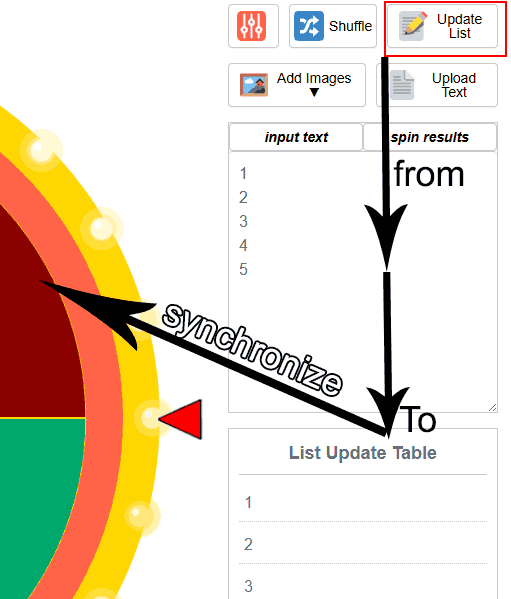
After setting up your list, click the ‘Update List’ button. This action instantly updates your data in the List Update Table and synchronizes the entries onto the wheel’s spinning slices. Before the spin, take advantage of customization options: You can add animations, fireworks, images for entries, and custom sounds. Finally, press the ‘Spin’ button and await the random results.
Advanced Unique function buttons (optional):
1. Popular Wheels
Don’t feel like typing or copying names? We have got you covered! You can play instant games using our huge library of ready-made templates. We have preloaded lists for almost everything—from numbers and letters to popular topics, fun games, and quick choices. Simply select a template you like, and the wheel will fill up automatically. Skip the typing and start spinning right away!
💡 Quick Tip: If the Wheel Freezes or Runs Slowly Over Time
This performance drop occasionally occurs on older Android devices (Android 8 and below) or low-spec computers with limited RAM. To fix this instantly:
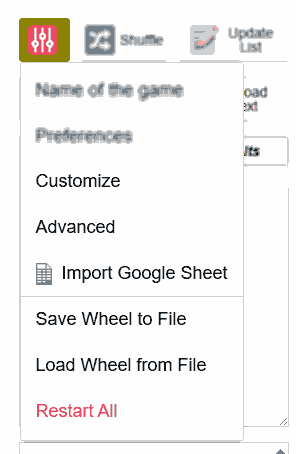
- Click on the Menu icon ⦀ Advanced (located in the top-right corner).
- Click on Restart All.
Additionally, you can clear your browser’s cookies and cache afterward—this action safely releases the memory that the browser may have accumulated over long periods of continuous use.
See also: Learn how to official clear cookies and optimize your browser on Android Phones, iPhones & iPads, Mac Computers, and Windows PCs.
2. Advanced Menu Button: Functions and Controls
Name of the game Menu:
Name of the Game: Allows you to title your current spinning session (e.g., Lucky Draw, Random Person to Assign Tasks, Team Picker, etc.).
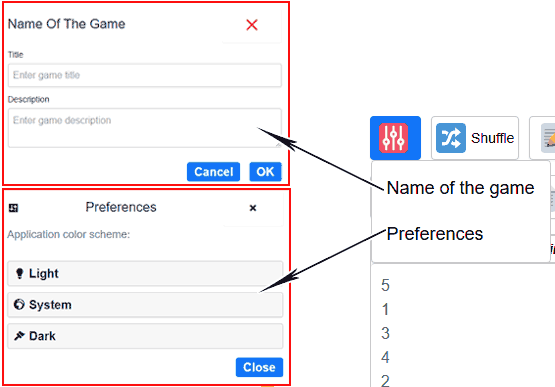
Preferences Menu:
Preferences (Theme): Enables you to select either a Light or Dark theme for the screen, customizing the visual mode to your comfort and preference.
Customize Menu: During Spin, After Spin, and Appearance Tabs:
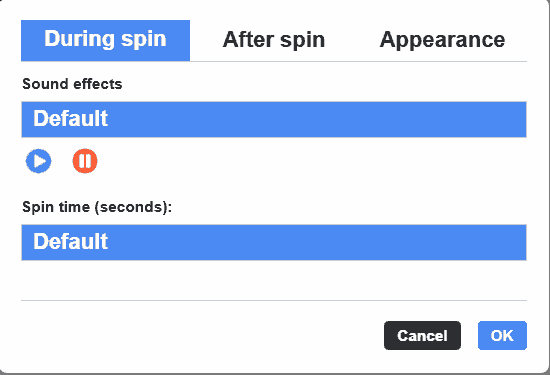
Tab During Spin Controls
- Sound Effects: Choose background music while the wheel is spinning—select from nearly 100 high-quality tracks to set the mood.
- Spin Time (Seconds): Adjust the spin duration to control the suspense and increase excitement.
Tab After Spin Controls
Sound: Customize the sound effect that plays to celebrate the winner.
Animate Winning Entry: Add dynamic visual effects for the selected winning item.
Display Popup with Message: Customize the title and message that displays when a winner is chosen.
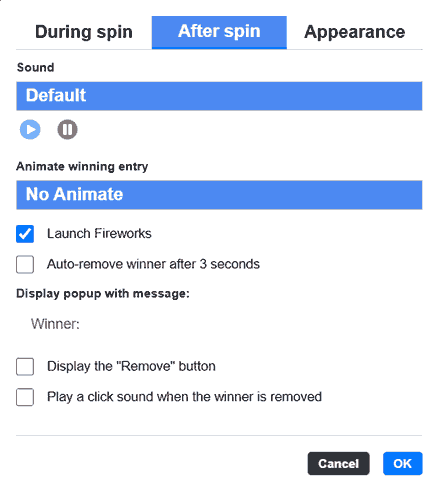
Options to enable or disable:
Launch fireworks
Auto-remove winner after 3 seconds
Display the “Remove” button
Play a click sound when the winner is removed
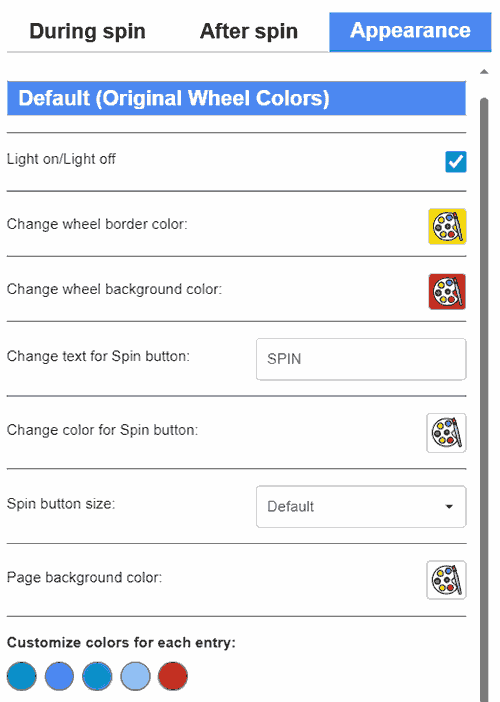
Tab Appearance:
Apply a Color Theme: Select from over 180 unique color themes for the wheel.
Lights On/Lights Off: Toggle the wheel’s dynamic lighting effects.
Change Wheel Border Color: Set a custom border color for the wheel itself.
Change Wheel Background Color: Set a unique background color for the wheel.
Change Text for Spin Button: Customize the text label displayed on the Spin button.
Change Color for Spin Button: Set a custom background color for the Spin button.
Spin Button Size: Select between a large or small size for the main Spin button.
Page Background Color: Set the background color for the entire webpage interface.
Page text color: choose the text color for the page
Choose a Custom Pointer: Want to make your spinner totally unique? You can easily pick your favorite winner arrow from a collection of nearly 100 custom pointers. Personalize your Wheel of Names exactly the way you like it to match your vibe!
Customize Colors for Each Entry: Individually adjust the color of each wheel slice or entry.
Advanced Menu:
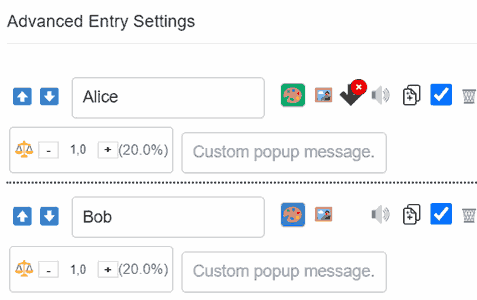
Adjust the Winner Popup Background Color: Celebrate your results in style by changing the overall background color of the winner announcement. This applies to every name on your wheel, making your winner popup visually appealing and perfectly matched to your event’s theme.
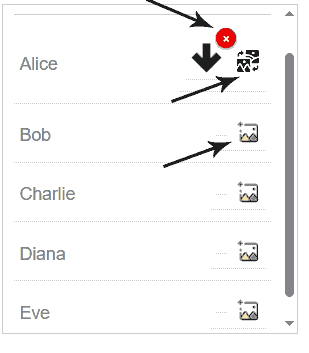
Up & Down Arrows: Adjust the order of individual entries.
Customize the text for each individual entry.
Set a unique background color for each individual entry.
Set a unique image for each individual entry.
Set a unique winning sound for each individual entry.
Custom MP3 Upload for Specific Names: Take your event to the next level by uploading a custom background track for individual winners! Note: Due to strict browser security features, refreshing the page (F5) clears your uploaded MP3, reverting to our default celebration music. You can easily re-upload it anytime you want!
Duplicate individual entries (useful for boosting their odds).
Enable or disable individual entries (temporarily removing them from the spin).
Delete individual entries.
Adjust the weight (size or probability) of each individual entry to affect its chance of being selected.
Customize the congratulatory title that displays for each winner.
Custom Message Color Icon: This is an advanced customization feature designed just for you! It allows you to set a unique background color for the winner popup, explicitly tailored for specific names or items on your spinning wheel.
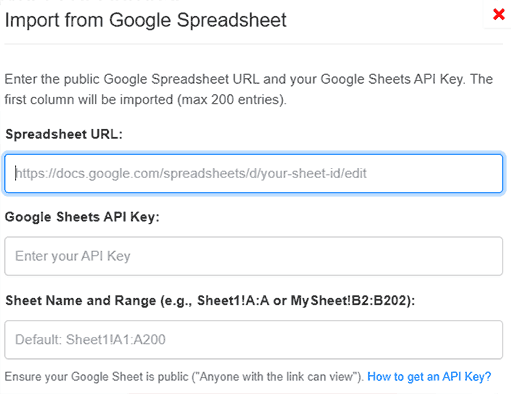
Import from Google Sheets:
Quickly import your text data directly from a Google Sheet.
Install the Wheel of Names App:
Get instant access without ever visiting a traditional app store! You can quickly install our web app (PWA) directly onto any device and operating system. Next time you need to make a random choice, simply launch the app straight from your home screen.
Save Wheel to File:
Save History: Save your current wheel setup and usage history to a .wheel file.
Load Wheel from File:
Load History: Load a previously saved .wheel file to restore your custom settings and entries. This function is very useful for quickly accessing your favorite setups without having to build them again from scratch.
Restart All:
Reset to Default: Deletes all current settings and instantly returns the wheel to its original, default state.
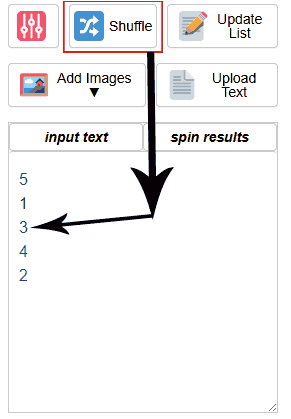
3. Shuffle Menu Button:
Shuffle: Randomizes the order of all entries to ensure maximum randomness and unpredictability.
4. Update List Menu Button:
Update List Button: Instantly updates the text data you entered in the input box, applies it to the List Update Table, and synchronizes the entries with the spinning wheel slices.
5. Add Images Menu Button: Features Four Customization Options
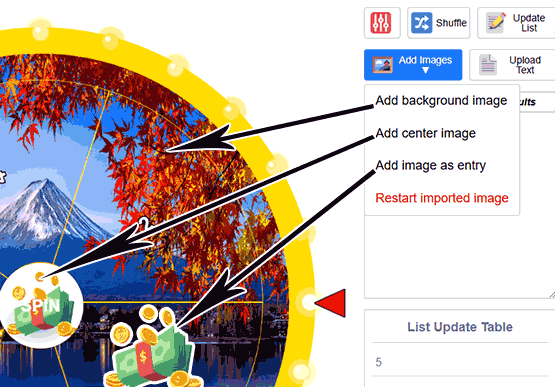
A. Add Background Image Menu:
Upload a photo from your device to use as the overall wheel background (such as pets or landscape photos to make it more fun).
B. Add a Center Image Menu:
Add an image from your device to the center of the wheel (spin box) to create a unique personality that fits your preferences.
C. Add an Image as an Entry Menu:
Upload images from your device to be used as backgrounds for the individual entries. Batch uploading is supported (select 1 or more images at the same time).
(Note: If you upload more images than entries available on the wheel, the system will only prioritize the first images selected.) Valid formats include: .jpg, .jpeg, .png, .gif, .webp.
D. Restart imported image Menu:
Deletes and clears all currently imported images from the tool, returning to the default state.
Tip for Individual Edits: To change the image for each entry individually without deleting all imported images, use the dedicated image edit button found in the List Update Table.
6. Upload Text Menu Button:
If your list is large, use this feature to quickly upload .txt and .csv files. This process significantly saves time compared to manual entry.
7. Manage Your Lists Easily with Fast Editing Tools
Are you a teacher picking students in class, a content creator hosting a fun online giveaway, or just need to make a quick decision? Typing out a long list of names by hand is a huge headache.
That is why our Random Name Picker Wheel (Wheel of Names) gives you six simple but powerful tools: Copy, Cut, Paste, Undo – Redo, and Download. These handy buttons make managing your names smooth, easy, and lightning-fast.
Why These Simple Tools Make Everything Easier
- Copy & Cut (Move Names Easily): Quickly copy or move parts of your name list to use somewhere else without losing your main data.
- Paste (Add Names Instantly): Add hundreds of names all at once! Just copy your text from Excel, Google Sheets, Word, or social media comments, and paste them straight into the name picker wheel with a single click.
- Undo & Redo (Fix Mistakes Safely): Accidentally deleted a huge list? Do not panic! The Undo button lets you go back to your last step instantly, and if you go back one step too far, Redo brings it right back. Together they let you experiment freely without ever worrying about losing your work — all without slowing down your phone or computer.
- Download (Save Your Work): Save your entire list into a simple
.txtfile directly to your device. It is the perfect way to back up your names so you can use them again next time.
Spin the wheel:
Click the “Spin” button to start the wheel. The system will automatically spin and stop at a random position.
View Results: The final selection is displayed immediately and can then be saved or shared.
Spin Results Menu Button:
Spin History Button: View a complete history of who or what was randomly picked during previous spins.
Accessibility for Everyone (ARIA Support): We fully support screen readers by making over 90% of our app’s buttons and features ARIA-compatible. If you have a visual impairment, you can confidently navigate and use our tool. We are deeply committed to building an inclusive digital community for all users.
Who is behind this wheel of names? Is it free?
Independent creator: Felix Wright built wheelofnames.name in April 2025 as a free alternative to existing random pickers — designed to be faster to load, simpler to use, and more customizable for teachers, event organizers, and content creators.
Since launch, the tool has grown to include 50+ ready-made templates spanning sports, food, gaming, and party games, serving a global user base. Felix continues to develop and maintain the platform solo, with updates based directly on user feedback.
Free Version: The basic version of the tool is provided completely free of charge, allowing immediate access and use.
_______________________________________
Applications of the Wheel?
Wheel of Names has a wide range of applications in many different fields, including:
Education: Teachers use it to pick a “Student of the Day” or form random groups for projects. It removes accusations of favoritism.
Business: Perfect for assigning tasks in Agile meetings (“Who speaks next?”) or running transparent customer raffles.
Events & Entertainment: Spice up parties with “Truth or Dare” wheels or door prize drawings.
Personal: Can’t agree on a movie? Put 5 options on the wheel and let fate decide.
Knockout mode: Perfect for elimination-style games… and much more waiting for you to explore!
Wheel Customization?
One of the key advantages of the tool is its high customization capability. You can:
Background Image: Choose an image to use as the overall background to match your event theme.
Sounds and Effects: Customize the spin sounds and the celebration effects after the wheel stops.
Spin Time: Adjust the speed and duration of the spin to increase the drama and anticipation.
Share Wheel?
After creating and customizing your wheel, you can easily share it with others:
Share via Social Networks: Use direct sharing buttons for platforms like Facebook, Twitter, Pinterest, and other social media platforms.
Saving the Tool as an App on Your Device
You can save the tool as an application on your device for easy access:
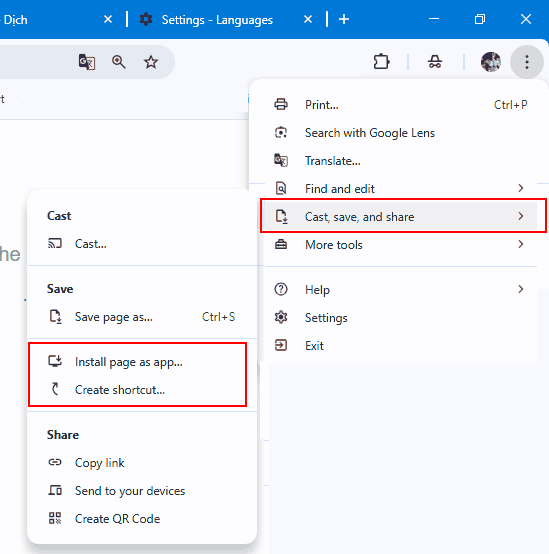
On Desktop: Use the browser menu feature (Cast, Save and Share) to select “Save as App” (Chrome, Edge) to install the page as an app, or select “Create a Shortcut”.
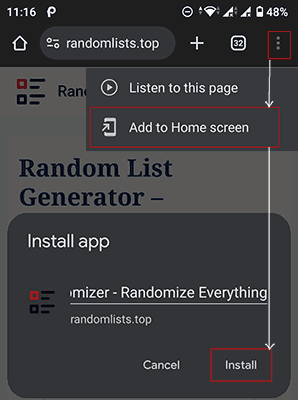
On Mobile: Add to your home screen using the “Add to Home Screen” option on the mobile browser for quick, one-tap access.
Privacy and technical details
In terms of security and technology, the tool commits to:
Protect User Data: We respect privacy via a strict privacy policy and compliance with regulations like GDPR, CCPA, COPPA and more.
Cryptographically Secure Randomness: We upgraded from basic Math.random to a highly secure Crypto algorithm to guarantee absolute fairness. By using hardware noise from your device, every single spin is truly unpredictable and 100% unbiased. You can completely trust our random name picker for completely fair results!
Secure Connection: Data is encrypted, and we use advanced security measures to protect user information.
Contact us for feedback or feature ideas
If you have any suggestions or feature ideas, please get in touch with us:
Social Media: Follow us and send messages via Facebook, Twitter, and Instagram.
Online Form: Use the “Contact Us” page on the website to submit your comments and feedback.
We are always listening and constantly improving based on user feedback.
Mobile and Desktop Apps
WheelofNames.name is designed for seamless use across both mobile and desktop platforms:
Mobile Application: Optimized for smartphones and tablets, featuring full touch support and a flexible, responsive display.
Desktop Application: Available as a web application version for desktop, allowing for reliable use in professional environments and presentations.
Wheel of Names vs. Other Spinners
When compared to other name spinners, Wheel of Names stands out due to its core strengths:
Simple, Intuitive Interface: Easy to use and navigate, even for beginners.
High Accuracy and Fairness: A reliable random algorithm guarantees unbiased selection.
Flexible Customization: Allows for high personalization and is suitable for diverse purposes.
Powerful Sharing Features: Easily share your custom wheels via social media platforms.
These strengths make the tool a top choice for educators, businesses, event organizers, and many others.
_______________________________________
FAQs and Troubleshooting:
What is the quickest way to add a long list of names or entries to the wheel?
The fastest method is using the Import Text Button. The tool supports instant uploading of large lists via .txt or .csv files, and it also features direct integration for importing data from Google Sheets. This significantly speeds up the process compared to manual entry.
Can I customize the appearance, sounds, and effects to match my specific event theme?
Yes, the tool offers high customization capability via the Customize Menu. You can adjust the spin duration to increase suspense, select background music, apply custom color themes, add unique entry images, and customize the winner sound effects.
How does the Wheel of Names ensure the selection is truly random and fair?
Guaranteed Unbiased Results: Wheelofnames.name is built to deliver absolute fairness. We completely ditched the basic Math.random function, upgrading to a true cryptographic-quality random number generator. By utilizing the hardware noise directly from your device, your outcome is securely determined the exact moment you hit spin. The exciting spin animation is purely visual entertainment; your actual result is mathematically 100% unpredictable and perfectly fair from the very start!
What should I do if I encounter an error while using it?
Try refreshing the page, checking your Internet connection, or contacting support via email or the “Contact Us” page.
Is the Wheel of Names tool free to use, and is it accessible worldwide?
Yes, the basic version of the tool is 100% free of charge and accessible globally. It is a web-based application optimized for any browser (Chrome, Edge, Safari) on both desktop and mobile devices. The interface also supports all major languages for maximum international accessibility.
Is there a limit to how many names I can enter?
You can enter hundreds of names! However, for the best visual experience (so the slices aren’t too thin), we recommend keeping it under 200 entries per spin. If you have more, you can spin multiple times.
Read more: wheel of names discussion section
View Author Profile: Author: https://wheelofnames.name/author/felix-wright/
Read more about Us: About website: https://wheelofnames.name/about-us/
*Connect with us: facebook, twitter, instagram, pinterest, medium, linkedin, bsky.app, Youtube, tumblr.com, threads.com.
Last Updated on July 10, 2026 by Felix Wright